
Home > tyGraph Support Articles > Link Reporting with the tyGraph Pages Report Bar
Download this articleLink Reporting with the tyGraph Pages Report Bar
Currently in Preview, tyGraph Pages Link Reporting allows you to evaluate the performance of links and navigation elements on a SharePoint page. After activating Link Reporting, hover over a link to see how many times it has been clicked. This helps you understand how links are performing and whether the links in your site, hub site, or global navigation are being used effectively.
Activating Link Reporting
To activate Link Reporting, the Report Bar must already be enabled on the current page.
Click the Link Reporting (Preview) button on the Report Bar.
You can then hover over most links on the page, including links in news articles, site navigation, hub navigation, and global navigation.
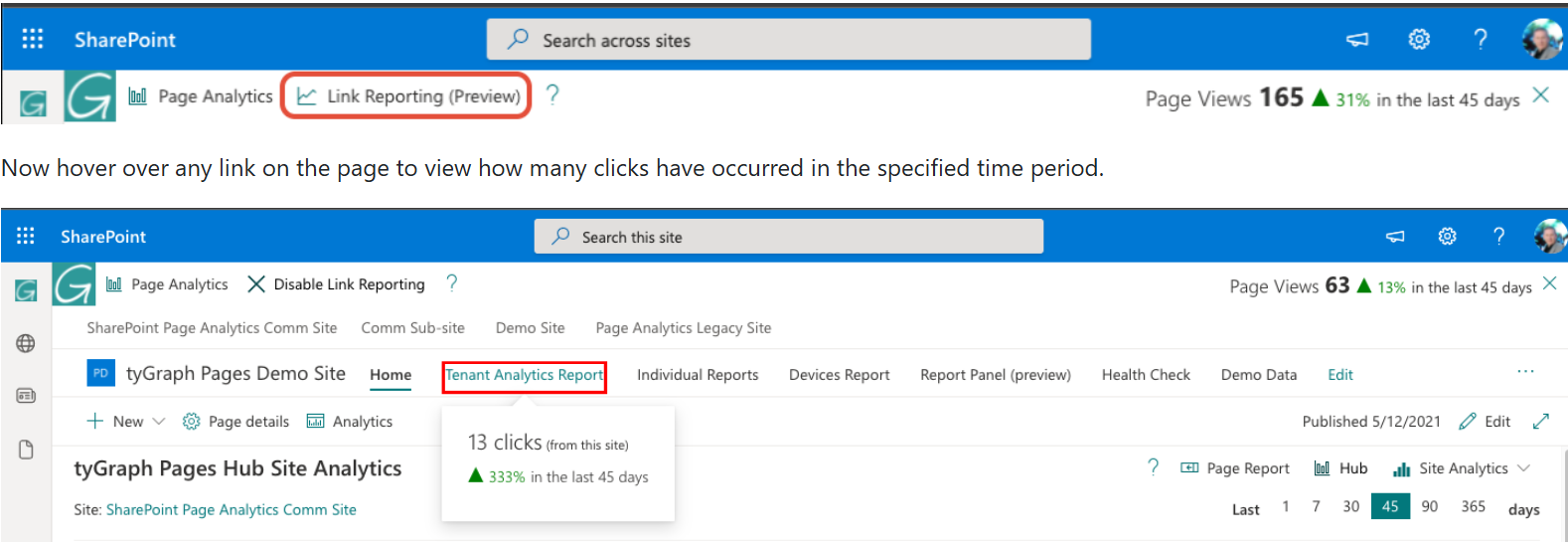
Adjusting the Time Dimension
Link Reporting uses the same time dimension as the Report Bar and Report Panel. By default, it reports activity from the last 45 days. If you want to use a different time range, click Page Analytics and use the slicer to choose 1, 7, 30, 45, 90, or 365 days.
Understanding the Scope of Link Reporting
Link Reporting shows the number of clicks for a link, but the scope depends on the type of link.
For example, if the link is part of hub navigation, Link Reporting includes clicks from any page in the hub, not just the current page. As a result, the click count for that navigation link will remain the same regardless of which hub page you are viewing. By contrast, links inside a news article or web part include only the clicks recorded on that specific page.
Limitations
Link Reporting may not be available for every web part, including custom web parts and the Hero web part. However, you can still review Hero web part performance through Page Analytics in the Report Panel. If a page contains multiple links that point to the same URL, the click count will be combined.
Preview Feature
Link Reporting is a Preview feature. You may encounter bugs or see differences in click counts while the feature is still being refined. It may also be unavailable for links in certain web parts, such as Hero.